
Last Updated: 2026-09-06
A barcode that will not scan stops a shipment faster than any machine failure. A barcode inkjet printer prints scannable linear and 2D codes directly onto products and packaging, and doing it well comes down to resolution, contrast, and surface. Five answers cover what it can handle.
The Short Answer
Five things a barcode inkjet printer can print, and the catch with each:
One: linear barcodes such as EAN and Code 128, which need clean, consistent bar edges. Two: 2D codes including QR and DataMatrix, which demand higher resolution. Three: variable data, serials, lot numbers, and dates that change every item. Four: text and small logos alongside the code in one pass. Five: codes on porous and semi-porous surfaces, cartons, kraft, and some films, where ink absorption is predictable.
| Code type | Resolution need |
|---|---|
| Linear barcode | Moderate, edge quality matters most |
| QR code | High, module size is small |
| DataMatrix | Highest, dense modules |
| Text and dates | Low |
The governing rule: the printer’s resolution must produce modules larger than the scanner’s minimum, with a quiet zone around the code and enough contrast to read.
What to Know in Practice
Verify with a verifier, not with your eyes. A code that looks fine on the line can fail grade checks after handling, and scan grade is what your customer or regulator measures. Test at the end of the distribution cycle, on the actual substrate.
Contrast is the quiet failure mode. Dark ink on kraft reads well; the same ink on a mottled or recycled board may not. When the substrate fights you, print a light panel first or move to a higher-contrast ink, rather than increasing print density.
About SHICAI
SHICAI builds industrial coding and marking equipment across inkjet and laser lines, for production and warehouse use. Machines ship with genuine components and tested consumables, and service and spares are arranged for export markets. The technical team answers directly rather than through a reseller chain.
Related Questions
- Can an inkjet printer print scannable barcodes?
- Yes, high-resolution inkjet prints scannable linear and 2D codes on porous surfaces. Verify scan grades on your actual material before committing.
- What resolution do I need for QR codes?
- Enough to make each module larger than your scanner’s minimum, typically 300 dpi class heads for small codes. Ask the supplier to print your actual code at your actual size.
- Why do my printed barcodes fail to scan?
- Usually contrast, module size, or ink spread on the substrate. Check the quiet zone first, then contrast, then resolution.
A Model Worth Looking At
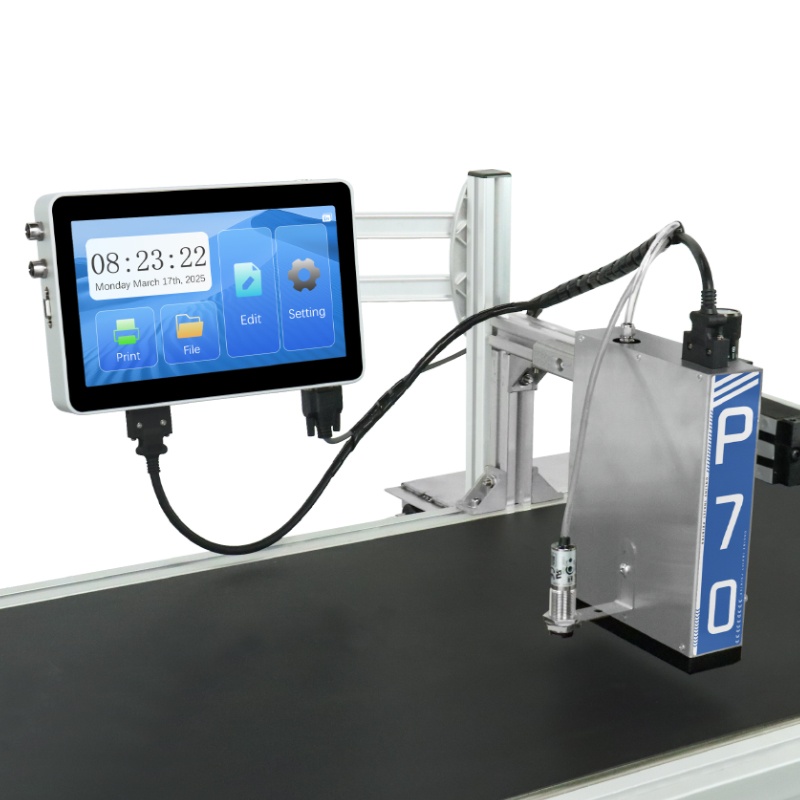
P70 Online inkjet printer is built for this kind of work:
- Print speed 1-100 m/min
- 180 dpi
- 3-71.8mm print height
- 10-inch touch screen
- 2-15mm throw distance
Click the image to see the product page.
Learn more about barcode and QR symbologies and ISO 9001 quality management.
Next Steps
- Read related FAQ guides on coding and marking basics.
- See the P70 Online inkjet printer for full specifications.
- Get a free sample print on your material. No commitment, reply within 24 hours.
Need help choosing the right printer?
Talk to our engineers for a free production-line assessment and quotation.
Request a Quote