Last Updated: 2026-10-08
A scanner reads light and dark, nothing more. A barcode printing machine turns a data string into that pattern of bars and spaces, and the symbol it picks decides how much data fits, how small the modules can be and how far away the code still reads. Five common symbols cover most pack work.
Five Symbols a Barcode Printing Machine Prints
The symbol is a design choice made before a machine is chosen.
| Symbol | Where it belongs | What it trades |
|---|---|---|
| Code 128 | Logistics labels and mixed data strings | Dense, so it needs a clean surface |
| EAN / UPC | Retail units a consumer scans | Fixed length, so it carries few fields |
| ITF-14 | Outer cartons and trade units | Wide bars tolerate a rough board |
| QR | High-data and mobile-scanned codes | Needs resolution to keep modules apart |
| DataMatrix | Small parts and tight panels | Very small, so contrast has to be high |
Linear symbols store a string along one axis. A 2D symbol such as a QR code or a DataMatrix packs the same string into a square, so it survives a scuff that would ruin a bar. That is why a 2D code printer is increasingly the default where a pack is handled roughly after marking.
What Actually Decides Whether a Code Reads
Four things separate a mark that scans from one that fails at the dock.
- Module size. Every symbol has a smallest element, and a head that cannot hold that element at your line speed will blur the narrow bars into the wide ones.
- Quiet zone. The blank margin on each side of the symbol is part of the specification, so a code printed hard against a print edge or a box corner is incomplete before it is scanned.
- Contrast. Dark bars on a light field read best; inverted colours depend on the scanner and are worth testing before a full run.
- Verification. A mark can be graded against a print quality standard rather than judged by eye, which is how a disputed batch is settled with data instead of opinion.
The published symbol standards fix the quiet zone and the bar widths, so a specification can be checked against the symbol rather than against the machine.
How SHICAI Sets Up a Barcode Printing Machine
SHICAI matches the head to the symbol first, then the frame to the line. A dense 2D code and a wide carton bar need different resolution, and the job is written from your data string rather than from a stock template.
Each unit stores the symbol as a job, so a shift change is a recall rather than a rebuild, and cartridges are held in several ink colors for the dark boards and films that a single grade cannot cover. ISO 9001 quality management is the frame the whole setup is documented against.
Common Questions
- Which symbol should an outer carton carry?
- ITF-14 for a trade unit a warehouse scans, or a QR code when the same carton must also be read by a phone in the field.
- Can one head print a bar code and a 2D code?
- Yes. The symbol is part of the job, so switching from a linear code to a DataMatrix is a file change, not a hardware change.
- How is a printed code verified?
- It is graded with a verifier that reports contrast, module size and quiet zone on a scale, so a borderline mark is caught before a customer finds it.
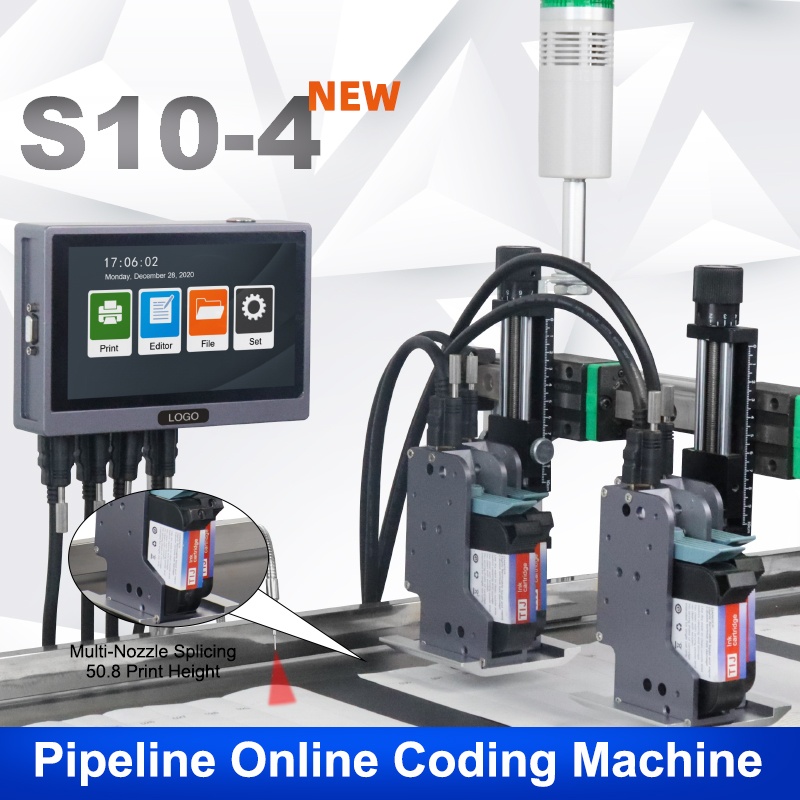
S10-4 online inkjet printer (standalone)
a wide-head build for a code that spans a panel:
- 2-50.8mm print height
- 2-5mm throw distance
- Prints Chinese, English, date, QR code and barcode
Choosing a Symbol for Your Pack
- Read next: one printer for a barcode, a QR code and a date, which shows how three fields share one pass
- See the machine: S10-4 online inkjet printer (standalone)
- Talk to us: send your data string and your pack through our contact page. We come back with the symbol and the head setting that read on your surface.
Need help choosing the right printer?
Talk to our engineers for a free production-line assessment and quotation.
Request a Quote