Last Updated: 2026-10-28
An industrial barcode printer high speed figure means little on its own, because a barcode is read as a pattern of dots rather than a line of type. What survives the belt is set by module size, dot integrity and how long the symbol stays under the head, and those three argue with each other.
The Short Answer
Speed is limited by the smallest element in the symbol, not by the printer. A 0.25 mm module needs dots placed close enough while the product moves, and doubling belt speed halves the dots landing in each module. Past that point the scanner guesses, and a guess is a verify failure at the dock.
So the useful question is not how fast the unit runs, but which symbol, at which module size, still grades a pass on that line.
The Arithmetic Behind Industrial Barcode Printer High Speed
A symbol spends a fixed time under the head. At 40 metres a minute a 60 mm label passes a fixed point in ninety milliseconds, a 30 mm one in forty-five. Every row has to be built inside that window, which is why a two-dimensional code is harder at speed than one line of text.
| Symbol | Module size | What limits speed |
|---|---|---|
| Code 128, 10 characters | 0.33 mm | Dot placement, not resolution |
| EAN-13 | 0.33 mm | Bar width ratio under acceleration |
| QR, 21 modules | 0.50 mm | Both axes at once, so dwell time |
| Data Matrix, 16 x 16 | 0.38 mm | Contrast on a dark or glossy surface |
The third row is where speed claims fall apart. A QR code needs a two-dimensional grid, and a belt that ramps mid-symbol stretches it on one axis until a phone refuses it.
Where the Claim Breaks on a Real Line
Three things break it. Acceleration comes first, because a drive that ramps after a stop changes dot spacing for the next few products. Substrate is second, since glossy film spreads a drop a porous carton absorbs. Verification is third and most forgotten: a symbol that scans on a bench can fail once the pack is shrink-wrapped and reflecting light.
The practical test is a grade, not an opinion. Print twenty symbols at production speed, scan each with the customer’s scanner and count the passes. A unit that grades at 60 metres a minute beats one rated at 120 that nobody verified.
How SHICAI Checks a Speed Claim
We print the buyer’s own symbol at their line speed before quoting a head count, and report the module size that passed. Spares and support are organised for export markets under ISO 9001 quality management.
The Head Behind Most of These Lines
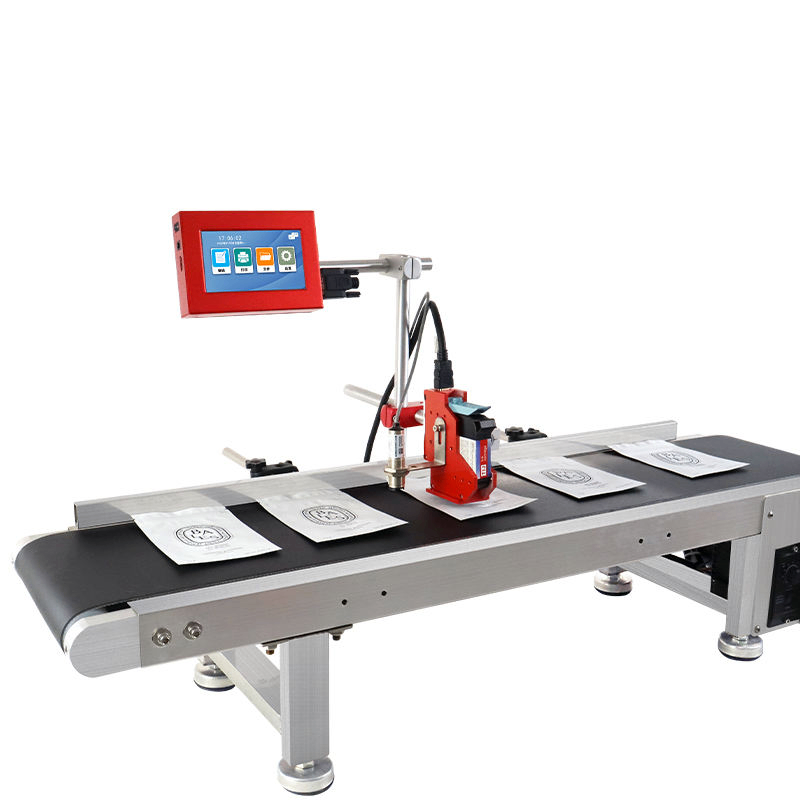
T110-Mini online inkjet printer
the compact online unit used for carton and label coding:
- Prints up to 100 m/min
- 600DPI HD print accuracy
- 2-12.7mm print height
- 5-inch touch Screen
- 2-5mm throw distance
At 600 dpi a dot is roughly 0.042 mm, so a 0.33 mm module holds about seven dots across, the margin a scanner needs after wear. The 100 m/min rating applies to continuous text; the barcode standard you print sets the real ceiling.
Related Questions
- Is 300 dpi enough for a barcode
- At 0.5 mm and low speed yes; at 0.25 mm on a moving line, no.
- Does ink colour affect scanning
- Contrast does, and a dark grade on a dark carton is harder to scan than a lighter grade on the same board.
- Can one head print text and a symbol
- Yes in one pass, though the block height then follows the symbol rather than the text.
Send the Symbol and the Line Speed
Send the exact symbol, its module size and the belt speed at the head. We print it at that speed, scan it as your customer will, and return the graded sample, so the industrial barcode printer high speed figure you buy is one that was measured.
Next Steps
- Trigger rules for a scanning line: barcode printer with conveyor.
- Start at the contact page, on +86 17625427465 or kuangcy@126.com. We reply in 24 hours.
Need help choosing the right printer?
Talk to our engineers for a free production-line assessment and quotation.
Request a Quote