Published 2026-09-05 · By the SHICAI technical team
Last Updated: 2026-09-05
A coder that drops offline mid-shift forces operators to hand-stamp cases. An automatic inkjet printer removes that bottleneck by printing date codes, batch numbers and logos directly on the conveyor at line speed. The catch is that buyers repeat the same five mistakes when specifying one.
What an Automatic Inkjet Printer Changes on the Line
An automatic inkjet printer mounts beside a conveyor and triggers each print cycle through a sensor, so codes land on every product without an operator. The shift from manual stamping to sensor-triggered printing matters most on lines running above 30 m/min, where operator speed cannot keep pace.
The S20 series runs on TIJ 2.5 heads. Four heads give a 101.6 mm print band, wide enough for a two-line lot code plus a logo.
But a sensor trigger and a wide print band are only the starting point. Where the unit actually earns its keep depends on the application, and that is next.
Where Automated Coding Earns Its Keep
Carton sealing lines are the most common fit. A 120 m/min rated speed covers most secondary packaging conveyors, and the 2 to 5 mm print distance tolerates slight flap variation.
Plastic pipe and extrusion lines also benefit. The trigger sensor fires as each pipe section passes, printing a traceability code without slowing the line or adding a labeling step.
Foam and wood round out the material list. The ink adheres to porous surfaces that manual coders struggle with.
Each application shifts the priority from raw speed to code durability, and that raises the first selection mistake.
Five Mistakes That Cost You
When you buy an automatic inkjet printer, these five mistakes account for most of the downtime and rework we see on export lines.
| Mistake | What it costs you | What to do instead |
|---|---|---|
| 1. Buying on peak speed alone | Codes drop when messages grow; real throughput is 40 to 60 percent of peak. | Test at your code size and line speed. |
| 2. Ignoring print height headroom | No margin for skew on a tight band. | Pick a print band 20 percent wider than your tallest code. |
| 3. Skipping sensor integration | Missed prints on product gaps and conveyor jams. | Specify a photosensor with adjustable delay. |
| 4. One ink for all substrates | Carton ink smears on plastic film. | Match ink to your top two substrates. |
| 5. No cartridge supply plan | Line stops when cartridges run dry. | Confirm cartridge stock before buying. |
Your substrate mix decides which ink and how many cartridges you need. Send us your top three materials for a free compatibility check.
Once you know what to avoid, the next question is who can deliver the unit configured for your line.
Where SHICAI Fits
SHICAI builds the S20 series in-house and ships to export markets with a 12-month warranty. The S20-4 standalone carries four TIJ 2.5 heads on a single mount, rated to 120 m/min with a 2 to 101.6 mm print band.
Cartridge supply, spare heads and a support contact for your region are part of the package. The S20-4 standalone is the model we recommend for mid-size lines.
A Standalone Pick for Mid-Size Lines
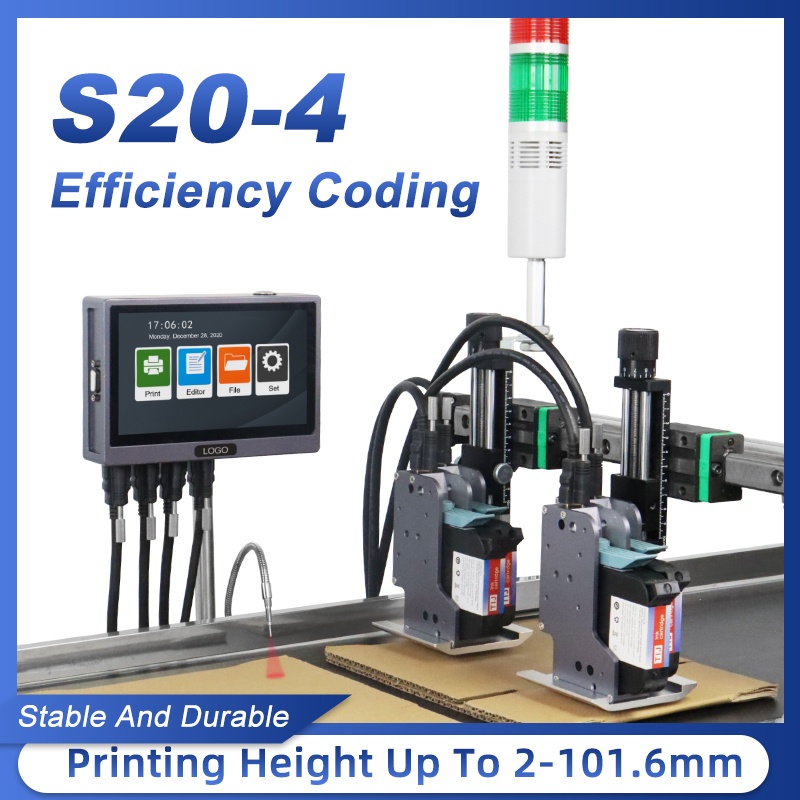
S20-4 online inkjet printer (standalone)
A four-head TIJ coder rated to 120 m/min with a 2 to 101.6 mm print band. It suits plants that need wide automated coding on cartons, pipes and foam.
- Prints up to 120 m/min line speed
- 2 to 101.6 mm print height across 4 heads
- Codes on metal, plastic, carton, foam and wood
Frequently asked questions
- What makes an automatic inkjet printer different from a manual coder?
- An automatic unit mounts beside a conveyor and uses a sensor trigger to print on each product as it passes. A manual coder requires an operator to stamp each item.
- Can the S20-4 print two-line date and batch codes?
- Yes. Four TIJ 2.5 heads give a 2 to 101.6 mm print band, with room for a two-line code plus a logo.
- What line speed does the S20-4 support?
- The S20-4 is rated to 120 m/min. Real throughput depends on your code size and message content, so confirm with a sample run at your actual line speed.
Next Steps
- See the S20-4 standalone model for full specifications and options.
- Read related solution guides on online coding and line integration.
- Request a free sample print and a fit check for your line. No commitment, reply within 24 hours.
Learn more about inkjet printing and ISO 9001.