Published 2026-09-07 · By the SHICAI technical team · Industrial marking & coding equipment guide
Last Updated: 2026-09-07
Loose labels, cards, and sachets are the hardest things to code. A pagination inkjet printer solves it by feeding each item separately and printing in the same pass, so one machine replaces a feeder and a coder. Four ways that saves space, steps, and time.
The Floor-Space Problem With Loose Products
Cartons and bottles arrive in a stream, so a coder mounts over the conveyor and the job is done. Loose flat products do not behave that way. Labels, cards, and sachets sit in stacks, and marking them means separating each item, presenting it to a printhead, then collecting it again. Traditionally that took two machines, plus the bench space and attention to run both.
A pagination inkjet printer collapses that chain into one unit: feed mechanism and print station share a frame, a controller, and a footprint. For plants coding loose flat stock, that is the difference between a dedicated station and a corner of an existing bench.
Space is only the visible saving; the deeper one is in handling.
Where It Earns Its Floor Space
Three situations come up repeatedly. Label and card production, where finished cards need a date or serial before packing and no conveyor line exists. Sachet and pouch packing, where products come off a form-fill-seal machine in a stack and need coding before cartoning. And mixed short runs, where the job changes hourly and re-tooling a line each time is not practical.
In all three the requirement is the same: single-item separation at a controlled pace, with the code landing in the same position every time. That is exactly what the paging mechanism delivers.
Which raises the question buyers actually ask: what do you give up by combining both functions?
4 Ways One Machine Saves Space and Steps
| Gain | Two machines | Integrated unit |
|---|---|---|
| Floor space | Feeder plus coder plus link conveyor | One frame, roughly half the footprint |
| Handling steps | Load, feed, transfer, print, collect | Load, print, collect |
| Changeover | Two setups synchronized by hand | One recipe, one set of adjustments |
| Operator attention | Two stations to watch and clear | One station, one jam point |
Four checks before you specify one. Confirm the thickness and size range covers every item you feed, because paging depends on friction and out-of-range stock double-feeds. Confirm the paging width against your largest card. Confirm code position is adjustable, since labels and cards rarely share a layout. And confirm print height covers your tallest message, with headroom for a barcode you may add later.
Compatibility depends on your stock. Send a sample for free testing, and we will run your items through the feed and report placement and adhesion.
Where SHICAI Fits
SHICAI builds industrial coding and marking equipment, including integrated paging and coding units for loose flat products, shipped to production sites overseas. The design priority matches the four gains above: one frame, one controller, one set of adjustments, so the machine fits existing space rather than requiring a new floor plan. Spares and support are organized for export markets, and the technical team answers directly.
The specification sheet is the easy part. The next section shows the integrated approach in a shipping model.
Recommended Model
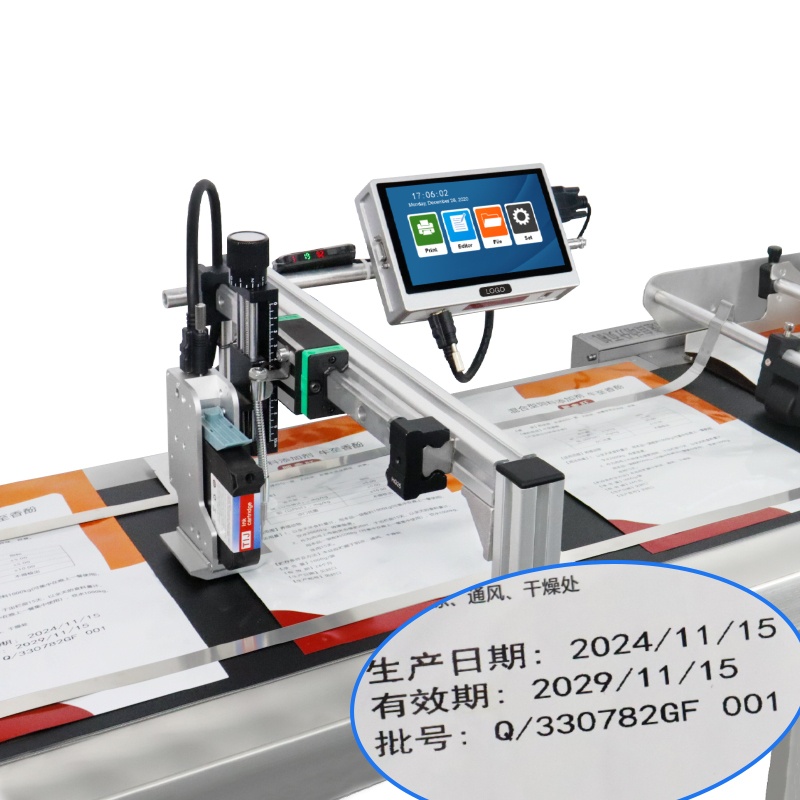
K10 online inkjet printer+paging machine
- Prints up to 120 m/min
- 600dpi HD print accuracy
- 7-inch Touch Screen
Paging and coding share one frame and one touchscreen, so a loose-stack job runs from a single station: feed, print, collect, with no link conveyor between them. Suits labels, cards, and sachets at short-run and mid-volume pace.
Frequently asked questions
- What products can a pagination inkjet printer handle?
- Loose flat and semi-rigid items: labels, cards, sachets, pouches, and printed sheets, within the machine’s thickness and width range. Rigid bottles and cans are better served by a line conveyor.
- Does combining feeding and coding slow the job down?
- No, and it usually speeds the overall cycle up, because the transfer step between two machines disappears. The paging rate sets the pace, and that rate is matched to the printer rather than the other way round.
- How do I stop double-feeds?
- Keep stock within the rated thickness range, align the stack before loading, and check separation pads on schedule. Double-feeds are almost always a stock or wear issue, not a settings issue.
Next Steps
- See the K10 paging and coding unit for full specifications and feed range.
- Read related solution guides on inline and conveyor coding.
- Send a sample for free print testing. No commitment, reply within 24 hours.
Learn more about inkjet printing and ISO 9001 quality management.