Published 2026-09-08 · By the SHICAI technical team · Industrial marking & coding equipment guide
Last Updated: 2026-09-08
A coder bought for a packaging line often fails on installation, not on print quality. An inkjet printer for packaging line work depends on five setup details: trigger position, encoder connection, head distance, message workflow, and access for cleaning. Get those right and the machine disappears into the line. Miss one and it becomes the station everyone works around.
Why Integration Decides the Outcome
A packaging line is a timing problem before it is a printing problem. Products arrive at speed in varying orientation, and the code must land in the same place every time. The printer is usually capable; what fails is the handshake between line and head.
That is why buyers who compare machines only on print height and speed end up disappointed. Two units with identical specifications behave differently once one sits on a shaky bracket ten millimetres too far from the product and the other holds the rated distance with a clean trigger signal.
The five checks below are the difference between those two outcomes, and every one of them is decided during installation rather than at purchase.
Where Line-Integrated Coding Pays Off
Carton and case coding is the classic case: a trigger spots each carton, the head fires as it passes, and the date or lot code lands in the same corner every time. No operator, no second station, no queue of unmarked stock waiting for a handheld unit.
Bottle and can lines add curvature and condensation, where throw distance and a fast-drying formulation matter. Flexible packaging adds film movement, so the head follows a surface that is not perfectly flat. Mixed-SKU lines add changeover pressure, which makes controller usability a throughput factor.
All three share the same five installation variables; which one bites hardest depends on the line.
5 Setup Checks for a Packaging Line Coder
| Check | What to verify on site |
|---|---|
| 1. Trigger position | Sensor sees every product once, at a fixed point, with no double-triggering |
| 2. Encoder connection | Line speed changes are tracked, so code spacing stays constant |
| 3. Throw distance | Head sits at the rated gap, typically 2 to 5 mm, and stays there |
| 4. Message workflow | Operators change date and lot fields in seconds from saved templates |
| 5. Service access | Head, sensor, and consumables reachable without moving guarding |
Check 3 causes most print-quality complaints and is the cheapest to fix: a bracket adjustment, not a purchase. Check 5 causes most neglect, because a head that is awkward to reach gets cleaned less often, and a less often cleaned head prints worse every week.
Line speed and mounting gap change the specification. Share your setup for a free fit check and we will confirm the configuration against your actual conveyor before you order.
Where SHICAI Fits
SHICAI builds industrial coding and marking equipment across inkjet and laser lines, including online coders designed to mount into existing packaging conveyors rather than replace them. Configurations run from a single head for one-line codes up to multi-head arrays for wide case marking, so the machine is sized to the code rather than padded to a higher price band. Spares and support are organised for export markets.
Specification sheets are easy to compare. The next section shows a line-ready configuration in a shipping model.
Recommended Model
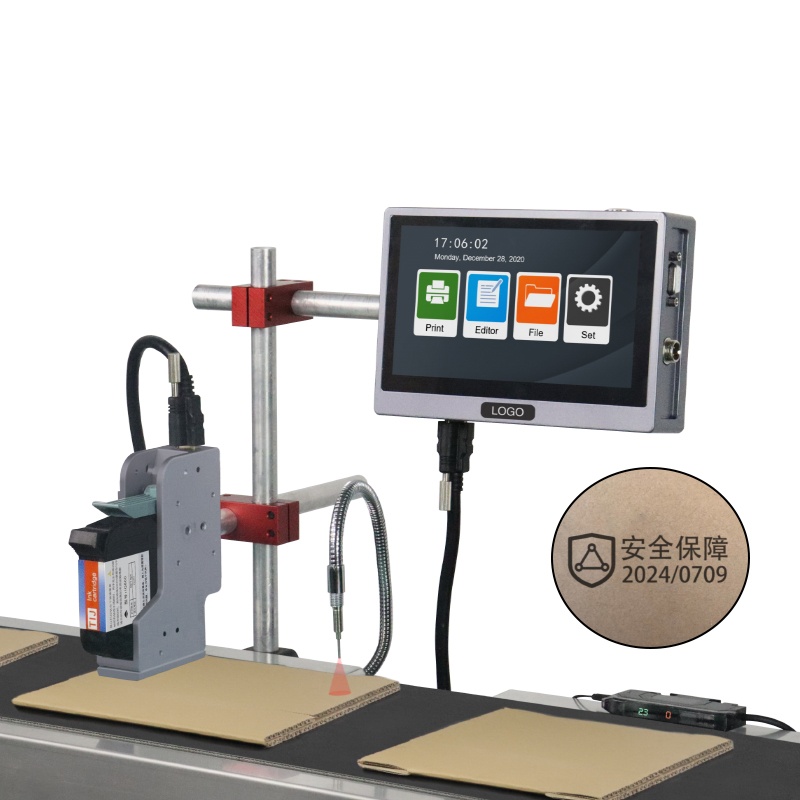
K20 online inkjet printer
- Prints up to 120m/min
- 2-25.4mm print height
- 7-Inch Touch Screen
A single-head online coder sized for packaging conveyors, with a 25.4 mm print height that covers case and carton codes and a touchscreen that keeps message changes at the line rather than in an office. Higher head counts in the same series cover wider marks.
Frequently asked questions
- What line speed can an online coder hold?
- Industrial online coders commonly hold clean codes between 40 and 120 metres per minute depending on code size and surface. Verify against your actual conveyor speed rather than the maximum rating.
- Do I need an encoder on my packaging line?
- If belt speed varies, yes. The encoder lets the controller adjust firing timing as the line accelerates, which keeps code spacing constant instead of drifting.
- Can one coder handle several packaging formats?
- Yes, with saved message templates and an adjustable head. Changeover time is the metric to ask about, because slow message changes consume line time every shift.
Next Steps
- See the K20 online inkjet printer for print height and head options.
- Read related solution guides on online and inline coding.
- Share your line setup for a free fit check. No commitment, reply within 24 hours.
Learn more about inkjet printing and ISO 9001 quality management.