Published 2026-09-09 · By the SHICAI technical team · Industrial marking & coding equipment guide
Last Updated: 2026-09-09
Codes on cartons, film, and pipe fail most often at the surface, not the machine. A sealing inkjet printer is built for exactly those materials, and five checks separate a unit that marks them cleanly from one that smudges. Here is what to verify before you buy.
Why the Seal Station Is the Right Place to Code
Coding at the seal station removes a whole handling step. The package is sealed and marked in the same pass, so there is no separate print station and no queue of closed packages waiting for a second machine. That matters most on pouch and film lines, where a loose code on a moving surface is a rework event.
The risk is the surface itself. Carton, plastic, metal, wood, and pipe each take ink differently, and a formulation that holds on film can smear on metal. A sealing inkjet printer earns its place when the ink is matched to the material and the head stays where the trigger can see every package.
The checks below lean on surfaces and setup rather than print resolution alone, because the sharpest print on the wrong formulation is still a failed code.
Where a Sealing Coder Runs All Day
Pouch and bag sealing is the core case: a continuous sealer closes the film and the coder marks date, lot, and batch in the same pass, triggered by the sensor as each package clears the seal jaws.
Carton sealing follows the same pattern, with the code landing on the flap as the case moves down the conveyor. Metal and pipe marking shifts the demand toward ink adhesion.
Mixed-material lines put the most pressure on ink choice: film in the morning, carton in the afternoon, each needing its own formulation and a quick message change.
5 Checks Before You Buy a Sealing Inkjet Printer
| Check | What to verify |
|---|---|
| 1. Surface match | The ink is rated for your carton, film, plastic, metal, wood, or pipe |
| 2. Ink colors | Seven colors available, so dark and light surfaces both stay readable |
| 3. Trigger setup | A sensor fires the head once per package as it clears the seal |
| 4. Line speed | The coder keeps up with the sealing conveyor at full rate |
| 5. Connectivity | USB or Bluetooth lets you edit messages from a computer |
Check 1 resolves most complaints before they happen, and it is the cheapest to get right: ask for a sample print on your actual material. Check 5 is the quiet productivity gain, because editing date and lot fields from a computer beats bending over a controller at the line.
Material and message change the specification. Share your surface and daily volume for a free fit check and we will confirm the ink and configuration before you order.
Where SHICAI Fits
SHICAI builds industrial coding and marking equipment across inkjet and laser lines, including seal-station coders sized to mount onto sealing conveyors rather than replace them. Machines ship with tested ink formulations matched to common packaging surfaces, and spares and support are organised for export markets. The technical team answers directly rather than through a reseller chain.
The next section shows a seal-station coder in a shipping model.
Recommended Model
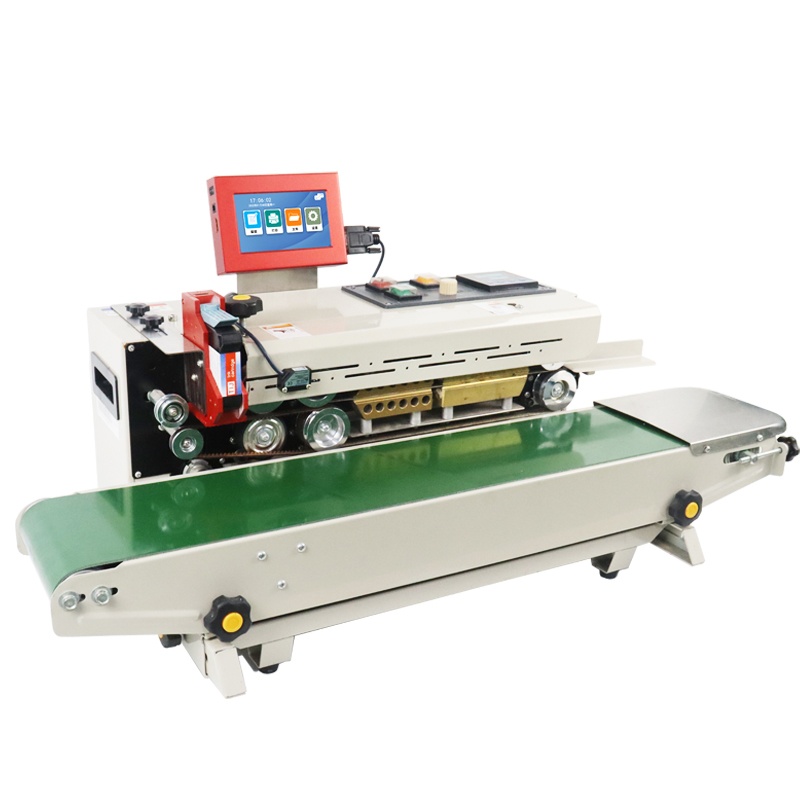
T110-K Sealing inkjet printer
- Available in 7 ink colors
- Marks carton, plastic, metal, wood and pipe
- USB/Bluetooth connectivity
A seal-station coder that marks carton, plastic, metal, wood, and pipe in seven ink colors, with USB and Bluetooth connectivity so operators edit date and lot fields from a computer rather than at the controller.
Frequently asked questions
- What surfaces can a sealing inkjet printer mark?
- Carton, plastic, metal, wood, and pipe, depending on the ink formulation. Match the ink to the surface, because a fluid rated for film will not hold on metal.
- How does coding at the seal station work?
- The coder mounts onto the sealing conveyor and fires as each sealed package passes a sensor, so the code is applied in the same pass that closes the package.
- Can I transfer messages from a phone or computer?
- Yes, where the model supports USB or Bluetooth connectivity. This lets you edit date and lot fields from a computer instead of at the controller.
Next Steps
- See the T110-K Sealing inkjet printer for surfaces and ink options.
- Read related solution guides on packaging and seal-station coding.
- Share your material for a free sample print. No commitment, reply within 24 hours.
Learn more about inkjet printing and ISO 9001 quality management.