Published 2026-09-11 · By the SHICAI technical team · Industrial marking & coding equipment guide
Last Updated: 2026-09-11
A coder and a conveyor bought separately often arrive as two problems instead of one solution. An industrial printer with conveyor integration works when five things are specified together: belt speed, trigger position, mounting gap, message workflow, and service access. Here is how to check them before the frame is bolted down.
Why the Pair Has to Be Specified Together
Coding on a conveyor is a synchronisation problem. The belt sets the pace, the sensor sets the moment, and the head fires inside a window measured in milliseconds. When printer and conveyor are chosen independently, that window is discovered on site rather than designed in advance, and the fixes are mechanical rather than cheap.
An industrial printer with conveyor integration treats the two as one system: belt speed matched to the coder rating, trigger and encoder positioned where the product is stable, mounting gap set to the rated throw distance, and guarding arranged so the head can still be reached for cleaning.
None of that is complicated, and all of it is easier to decide on paper than to retrofit.
Where Conveyor-Integrated Coding Pays
Standard packaging lines are the main case: cartons, bottles, and film moving at a steady pace, each needing a date, lot, or serial code in the same position. A conveyor-integrated coder removes the handling step entirely, which is where the labour saving comes from.
Off-line coding stations are the second case. Products made elsewhere, or coded in batches between shifts, need their own short conveyor section so the coder has controlled movement to work against. That station is often cheaper than breaking into an existing line.
Multi-material lines are the third. Labels, board, and film behave differently under the head, and a conveyor that presents them consistently lets one coder handle all three without adjustment between runs.
5 Checks Before You Specify the Pair
| Check | What to confirm |
|---|---|
| 1. Belt speed | Coder rated above your real speed, with headroom for changeovers |
| 2. Trigger position | Sensor sees each product once, at a stable point, no double-trigger |
| 3. Mounting gap | Head at rated throw distance, typically 2 to 5 mm, and stays there |
| 4. Message workflow | Templates and date fields an operator can change in seconds |
| 5. Service access | Head, sensor, and consumables reachable without removing guarding |
Check 3 causes most quality complaints and costs nothing to fix, because it is a bracket adjustment. Check 5 causes most neglect, because a head that is awkward to reach gets cleaned less often, and print quality declines slowly enough that nobody notices until a customer does.
Belt speed and mounting gap decide the specification. Share your setup for a free fit check and we will confirm the pairing against your actual conveyor before you order.
Where SHICAI Fits
SHICAI builds industrial coding and marking equipment across inkjet and laser lines, including online coders that mount onto existing conveyors and compact units for standalone stations. Configuration follows the five checks: head count and print height matched to the code, speed rating matched to the belt, and a controller chosen for the people who will run it. Spares and support are organised for export markets.
The next section shows a standard conveyor-integrated configuration in a shipping model.
Recommended Model
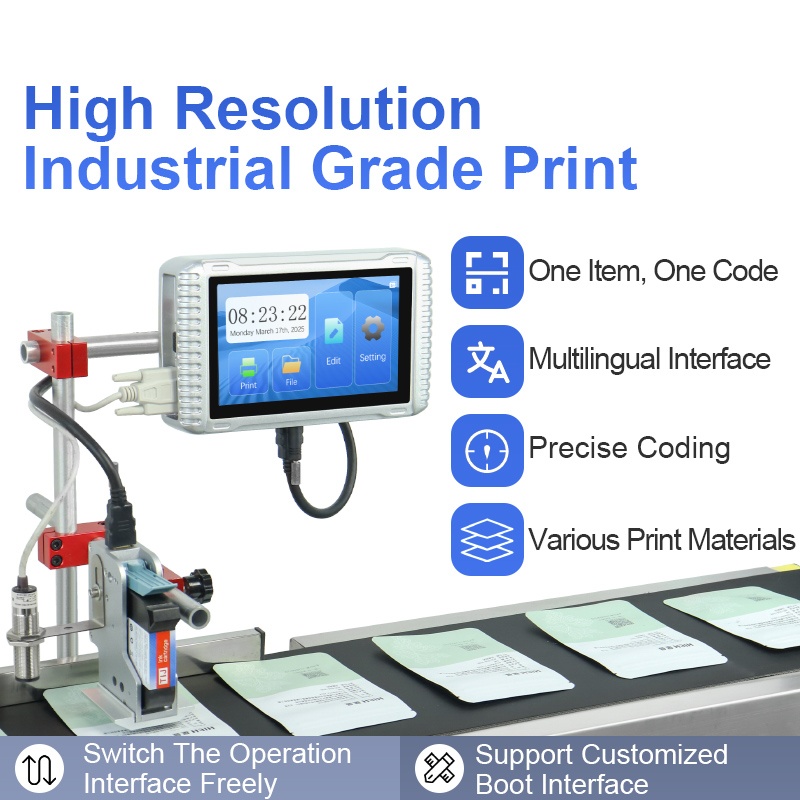
L10 Online inkjet printer
- Prints up to 120m/min
- 2-12.7mm/2-25.4mm print height
- 7-Inch Capacitive Touch Screen
A standard online coder for conveyor-integrated work: rated well above typical packaging belt speeds, with print height options that cover both small date codes and larger case marking, and a capacitive touchscreen that keeps message changes at the line.
Frequently asked questions
- Can an existing conveyor be fitted with a coder?
- Usually yes. The work is a mounting bracket, a trigger sensor position, and power, plus enough access for cleaning. Plan those before the machine arrives rather than after guarding is fitted.
- Do I need an encoder with a conveyor coder?
- If belt speed varies, yes. The encoder lets the controller adjust firing timing as the line accelerates, which keeps code spacing constant instead of drifting.
- What if my products are several different materials?
- One coder can handle mixed materials if the presentation is consistent and the formulation suits each surface. Verify with samples on every material you run, not just the easiest one.
Next Steps
- See the L10 Online inkjet printer for speed rating and print height options.
- Read related solution guides on online coding and line integration.
- Share your conveyor setup for a free fit check. No commitment, reply within 24 hours.
Learn more about inkjet printing and ISO 9001 quality management.