Published 2026-09-14 · Last Updated: 2026-09-14 · SHICAI technical team · Industrial coding guide
Most coding faults on a moving line are installation faults, not printer faults. An online inkjet printer mounts over the conveyor, triggers from a sensor and fires while the product passes, so the mounting gap, the triggering and the drying window decide the result long before the model number does.
What an Online Inkjet Printer Has to Do
The machine prints onto a product that never stops moving. A thermal inkjet head sits 2-5 mm from the surface, fires on a trigger signal, and the controller corrects the code length from an encoder as line speed changes. Nothing touches the product, so there is no roller to keep clean.
The specification is therefore written around the line, not the printer: bracket, sensor position and drying time decide whether the code still reads at the end of a shift.
Line Types an Online Inkjet Printer Suits
Cartons are the common case: a short code at up to 120 m/min on an S20 frame. Labels and rolls are the second, where a web picks up a variable field.
Pipe, cable, foam and metal parts are the third. They are less forgiving of a long throw distance, so the mount must hold the 2-5 mm gap steadily.
Five Mistakes That Cost Uptime
These five turn up most often in a post-run audit.
- Matching the brochure speed instead of your own. A rating of 120 m/min is reached with a specific code height and resolution, so a rating quoted without the code proves nothing.
- Leaving the encoder out. A trigger starts the print, but only an encoder keeps the code length constant as the conveyor accelerates.
- Choosing ink by price rather than substrate. A formulation that smears on film, or dries too slowly for the next step, gets repurchased rather than used.
- Forgetting the mounting gap. Hold 2-5 mm from a moving surface, and set the gap for the thinnest product on the line.
- Buying on the invoice price alone. Spare cartridges and a support contact are part of the cost; a cheaper machine with no spares window stops the line faster than it saves.
| Check before you order | What to write down |
|---|---|
| Code content | Height in mm, number of lines, whether a symbol is included |
| Line speed | Fastest sustained speed, not the average |
| Triggering | Sensor type and whether an encoder is fitted |
| Substrate and drying | Material, and the seconds before the next handling step |
| Mounting | Available room, bracket stiffness, and the thinnest product on the line |
An online inkjet printer supplier who asks for all five columns before quoting is usually the one whose machine fits first time.
SHICAI Build and Support
SHICAI builds coding systems in China and supplies them factory-direct, with spares and service arranged for overseas customers. Staff answer application questions directly rather than through a reseller chain, and the build is confirmed against ISO 9001 quality management certification on request. Choosing an online inkjet printer supplier is therefore a question about support as much as about the machine. The method behind the ink is summarised on the public reference for inkjet printing.
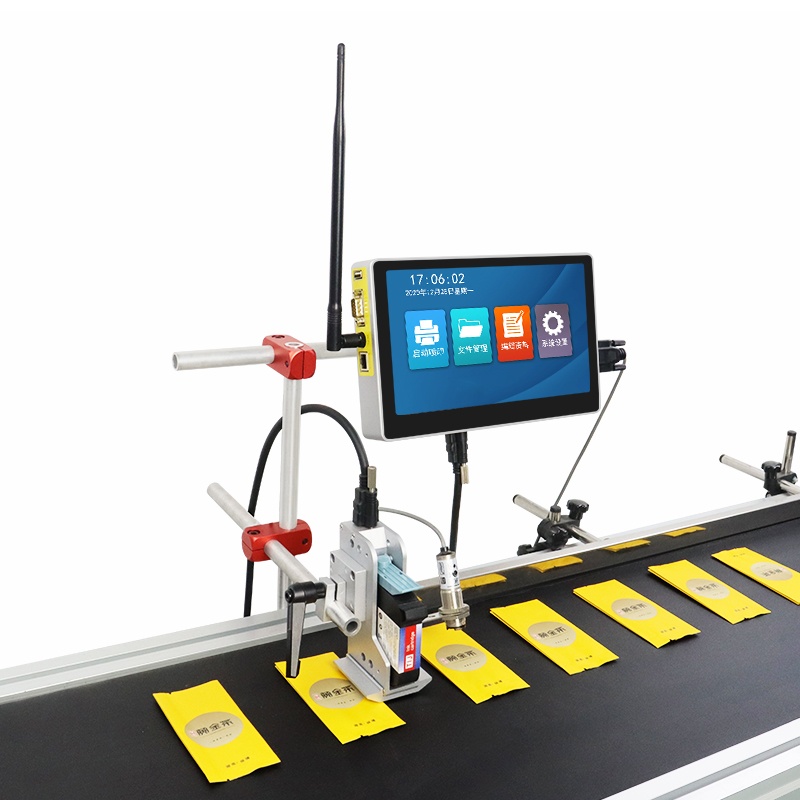
S100 Online inkjet printer
A single-head frame for lines that need one clean code: a 10-inch touchscreen, a 2-5 mm throw distance and a body weighing about 3 kg.
- Prints up to 100 m/min
- 600dpi HD print accuracy
- 10-inch touchscreen
Sizing Questions
- What speed can an online inkjet printer run at?
- Our S20 frames are rated up to 120 m/min and the S100 up to 100 m/min, but the usable figure depends on the code.
- Does an online inkjet printer need a trigger and an encoder?
- A trigger starts the print on each product, and an encoder keeps the code length constant as line speed changes. Without the encoder, the code stretches whenever the conveyor speeds up.
- What does an online inkjet printer cost?
- Ask for a configuration quotation with the mount and the trigger listed as separate lines, so two offers can be compared.
Where to Go From Here
- To see the multi-head alternative, compare the S20-6 online inkjet printer (splicing) with the S20-4 online inkjet printer (standalone).
- For the bands behind a configuration, read the coding machine price guide.
- Send the code, the fastest line speed and a photo of the mounting position to kuangcy@126.com or +86 17625427465. We reply within 24 hours with a configuration, and a sample on your own material is free.