Last Updated: 2026-10-21
A piezo inkjet printer automatic is sold on print height, and judged on wiring. The head can cover 71.8 mm in one pass and still put the mark in the wrong place, because a wide print follows the line rather than the other way round.
Why a Piezo Inkjet Printer Automatic Follows the Line
A narrow code is forgiving. A two-line mark at 40 mm or a logo block at 70 mm is not, because every millimetre of width multiplies the error introduced by a sensor that fires late or an encoder that reports a slightly wrong speed. On a static bench nobody notices; at 60 metres per minute the mark skews and the operator blames the head.
That is the difference between a coder and a piezo inkjet coding machine wired into a line. Printing is the easy part; everything that decides quality sits upstream.
Five Connections Behind the Mark
| Connection | What to state on the drawing | What it prevents |
|---|---|---|
| Product sensor | Type, gap to product and the pulse width the controller expects | A mark that starts late on fast product |
| Encoder | Pulses per metre from the line shaft, not from a guess | A mark that stretches as the belt speeds up |
| Print trigger window | The distance from sensor to head, measured loaded | Marks landing on the gap between products |
| Stop signal | What happens to the current print when the line halts | A half-finished mark left on the product |
| Alarm output | Which fault the line should see, and how | A blocked nozzle found at the pallet, not at the head |
Read the second row twice. An encoder figure taken from the drive nameplate is usually close and occasionally wrong, and the error only shows on the widest mark you print.
Rate, Height and Gap Together
Three numbers travel together and cannot be chosen separately. The piezo inkjet printer automatic build below prints from 1 to 100 metres per minute, reaches a 3 to 71.8 mm print height and works at a 2 to 15 mm throw distance, at 180 dpi. Push the speed to the top of the range and the wide mark has less time under the head; widen the gap towards 15 mm and the mark softens at the edges.
The honest method is to fix the height first, then the gap the frame allows. Whatever speed remains inside those two constraints is the rate the line holds all shift.
A 10 inch capacitive touch screen matters here for a practical reason: the operator who changes the date is usually wearing gloves and standing next to a running belt, and a wide mark means more fields to check on the panel.
Mounting a Head That Prints 71.8 mm Wide
A wide head carries more leverage than a small character unit. Bolt the bracket to the machine frame rather than to a guard, set the head parallel to the product path with a straight edge, and leave the sensor adjustable, because the distance from sensor to head will be re-set the first time the product changes.
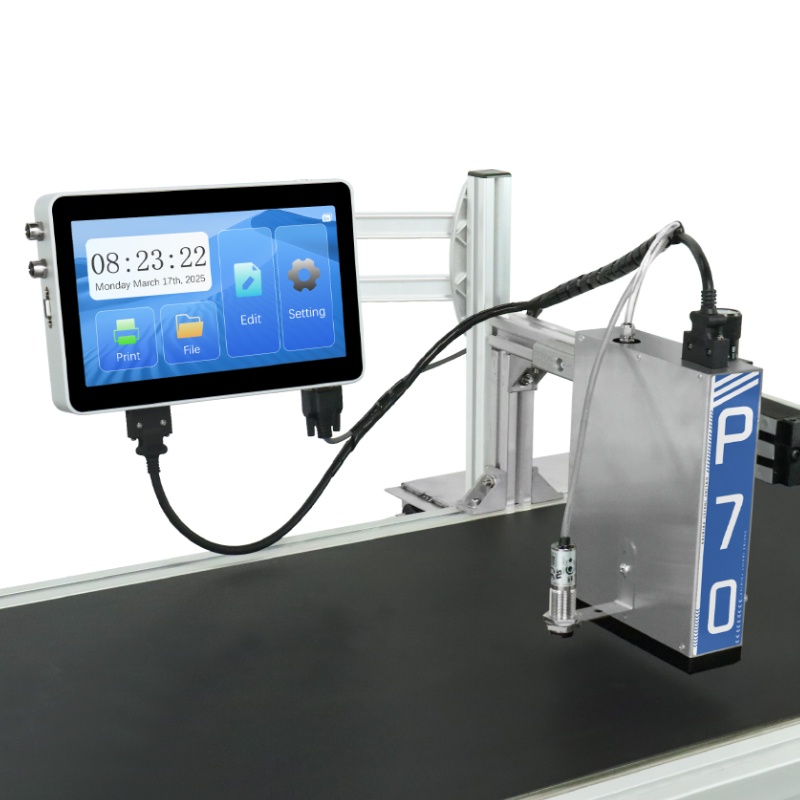
P70 Online inkjet printer
the wide-head build for a wired line:
- Print speed 1-100m/min
- 180dpi print accuracy
- 3-71.8mm print height
- 10 Inch Capacitive Touch Screen
- 2-15mm throw distance
The single-head version is quoted at 699 USD in the current list; the twin-head build is priced separately. Builds follow the route described in the ISO 9001 quality management standard, and the general mechanics of a drop-on-demand head are covered in the account of inkjet printing.
Line Questions
- Does a wide head print a logo and a date at the same time?
- Yes, in one pass, provided both sit inside the 71.8 mm window and the data is loaded before the trigger.
- Can the encoder be replaced by a fixed timer?
- Only where the belt speed never changes. On a line with a variable drive, a timer produces a mark that changes length with the speed.
- What happens if the product gap closes up?
- The head keeps printing on its own trigger and marks the gap. A small delay plus a minimum-gap setting on the line is the usual fix.
Send the Line Data, Not the Brochure
Give us the sensor type, the encoder figure and the height you need. We will return the trigger window and the gap setting for the piezo inkjet printer automatic build before a quotation, so the first mark lands where the drawing says it will.
Next Steps
- Send your product sample and the three line numbers. We return a marked sample with the settings written down.
- Start at the contact page, on +86 17625427465 or kuangcy@126.com. We reply within 24 hours.