A thermal inkjet printer earns its place on a bench by doing one job well: it prints date codes, batch numbers, or small logos onto products and packaging finished by hand or in short runs. Desktop units bring industrial coding to workshops and labs without a conveyor installation. If you are comparing thermal desktop coders, the short answer is that most mid-size shops can buy a capable unit at or below $549 for a base configuration, and the rest of this guide covers what to compare before you buy.
thermal inkjet printer in 2026: what it really costs
Pricing depends on configuration, but SHICAI keeps a base desktop coder at or below $549 — a level most production lines can absorb without a separate capital request. The figure moves with the source, power rating, marking area, and automation, and volume buyers usually land lower. For the current quotation and export terms, contact our team — we price to your specification rather than to a list.
What to look for in a desktop thermal coder
Four specs decide whether a desktop unit earns its keep. Printhead technology sets resolution and running cost — thermal inkjet heads are inexpensive to run and print sharply at small character sizes. Substrate range decides what it can handle: paper, cartons, plastic film, and lightly curved metal all print well when ink and head are matched. Operation should be straightforward — a standalone touchscreen, preset messages, and quick job changes suit bench work. Footprint and integration matter less than dependability: a desktop coder earns its place by printing the same code the same way every day.
Keeping a desktop thermal coder running
Routine care is mostly prevention. Keep the printhead capped when idle — thermal heads dry out fast and a dried nozzle edge ruins codes. Change cartridges on schedule rather than waiting for empty, and run the cleaning cycle after heavy jobs. Keep the unit in a clean, dry spot away from dust and temperature swings. A desktop coder that starts clean every morning prints clean all day.
Where to buy a thermal desktop coder without regret
The cheapest invoice is rarely the cheapest machine. Experienced buyers watch what never shows up on a spec sheet: genuine printheads and cartridges, spare parts and support six months after purchase, and whether the machine adapts to your line. Many buyers ask suppliers to confirm ISO 9001 quality management certification before signing. The real difference is service reach and how honestly a builder scopes your application before you pay, not the logo on the cabinet.
Where SHICAI fits
SHICAI builds industrial coding and marking equipment in China and builds desktop coding machines for benches, labs, and small production runs. Factories in packaging, electronics, and automotive supply chains keep them on the floor because the machines hold calibration through long runs, support and spares are organized for overseas customers, and pricing reflects factory-direct sourcing. If you want a marker that keeps running and a supplier who answers when something drifts, that is the case SHICAI makes.
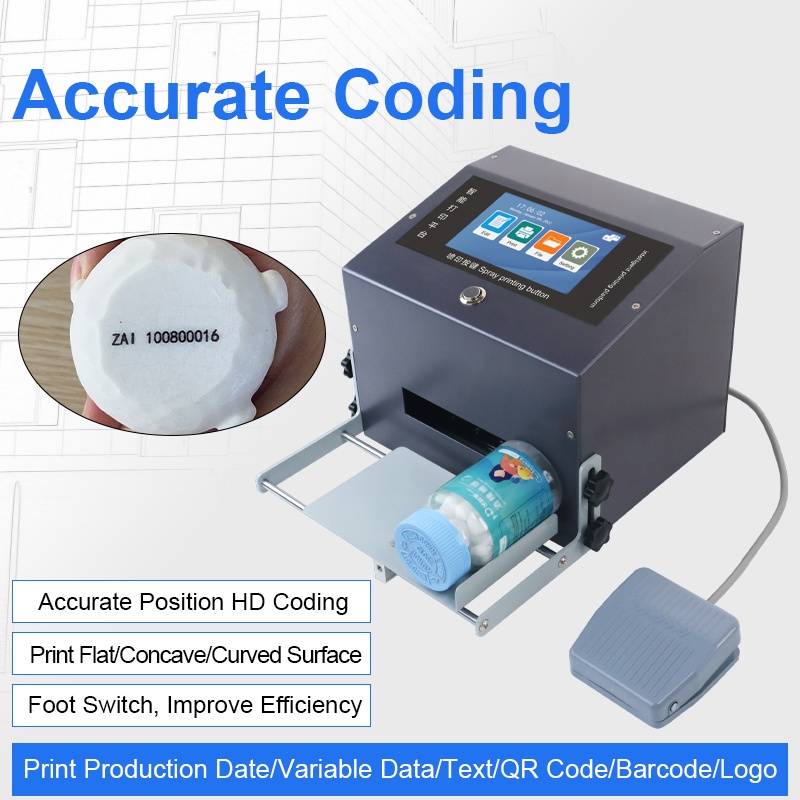
One model worth a look: G12 Desktop inkjet printer
If you want to see how SHICAI handles this application in practice, the G12 Desktop inkjet printer is one of the models built for it — engineered for steady production runs, with the calibration stability and overseas support we touched on above. It is a concrete example of the build approach described here.
Frequently asked questions
- What does a desktop thermal coder from SHICAI cost?
- A base desktop thermal coder from SHICAI is priced at or below $549; the exact figure depends on configuration and volume, so ask the team for the latest quotation.
- Should I buy from a thermal desktop coder supplier or a local reseller?
- Both have their place. Buying from the supplier often lowers cost and speeds support, but a good local reseller earns their margin with on-site service.
- What materials can a desktop coder print on?
- Desktop inkjet coders handle most flat and lightly curved surfaces — paper, cartons, plastic film, and metal — when the resolution and ink are matched to the substrate.