Last Updated: 2026-10-13
An inline inkjet printer with conveyor earns its place when every carton leaves the line already checked. The head marks the pack, a camera reads the mark back, and a rejected carton never reaches the pallet. Five settings decide whether that loop holds once the belt is running at full speed.
What a Checked Line Costs to Run
An inspection loop is not a second machine bolted onto the line. It is a decision taken at the head: mark first, verify at once, and let the belt carry only what passed.
A single trigger that drives both a print head and a check takes less floor space than two stations, and it removes the gap where an unchecked pack can slip into a pallet. The trade is that the check has to keep pace with the belt, which is where most of the design work sits. Where the traceability record matters, the paper trail is audited against ISO 9001 quality management.
Three Jobs Where the Loop Pays
Three jobs make the footprint worth arguing for:
- Carton and case coding. Batch, date and a barcode on one panel, with the read returning a pass or a reject before the case is taped.
- Tray and sleeve runs. Short runs where a misread would otherwise be found at the retailer, long after the pallet left the dock.
- Private-label reels. A mark checked at the head saves a converter from opening every reel to confirm the print.
All three are judged the same way, on whether a bad pack can reach the pallet at all.
Five Settings for an Inline Inkjet Printer With Conveyor
Settle these five before the frame is ordered, because each one is harder to change once the station is on the floor.
| Setting | What good looks like | What it prevents |
|---|---|---|
| Trigger point | One encoder pulse per pack | A mark that drifts when the belt surges |
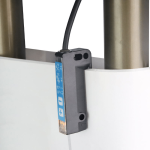
| Read window | Camera 80 to 150 mm past the head | A blur caught while the pack is still moving |
| Print height | 2 to 12.7 mm across the case panel | Characters clipped at the tape edge |
| Reject action | A gate that fires inside one pack length | A failed carton reaching the pallet |
| Barcode grade | Scored with your own scanner | A code that reads on site but not at goods-in |
The read window is the setting most often left to the eye. A pack travelling at 40 m/min moves about 670 mm in a second, so a window measured in millimetres is really a timing decision. The published account of inkjet printing covers the drop side of the same problem.
How SHICAI Sets an Inspection Station
SHICAI builds coding and inspection onto one frame rather than selling a camera as an add-on. Every station is set against the pack the customer actually runs, so the trigger and the read window are tuned to the real gaps on the belt.
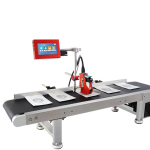
The station below pairs a print head with a vision check and a barcode reader on a single frame. It returns one result per pack, not two logs that have to be reconciled at the end of a shift.
Line Questions
- Does the camera slow the line down?
- No. It is triggered by the same encoder pulse as the head, so the read happens while the pack is already moving on. Only a reject changes the cycle.
- What if the print is right but the barcode will not scan?
- That is a grade failure rather than a print failure. The verifier scores the symbol against the standard your customer uses, so a marginal code is caught at the head instead of at goods-in.
- Can this be added to a line already running?
- Usually yes, provided there is 80 to 150 mm of belt past the head. The trigger is taken from the existing encoder, so the drive does not have to be replaced.

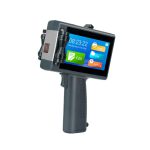
Visual inspection Inkjet Printer
a station that marks and checks a pack in one pass:
- Detects missing or defective codes automatically
- 2-12.7 mm spray printing height
- Reads barcodes for closed-loop verification
- Pairs coding and inspection in one station
Send a Sample Pack
- See the station: Visual inspection Inkjet Printer
- Read next: five mistakes that cost uptime on an online line, the same trigger problems seen from the maintenance side
- Talk to us: send one printed pack and your belt speed through our contact page. We return the trigger setting and a no-commitment quote, free of charge.