Last Updated: 2026-10-28
A marking machine with conveyor is usually sold on head speed and installed on a belt nobody measured. The number that decides whether a code lands square is how long the product stays inside the print window, and that is a function of pitch, not of the specification sheet.
What a Marking Machine With Conveyor Really Sets
A conveyor does not give a head more time, it gives a fixed slice per product. At 30 metres a minute a 100 mm carton passes a fixed point in a fifth of a second, and every character has to be fired inside that fifth. Speed ratings quote the belt, never the block.
So write the block down first: how tall the date is, how many lines, whether a QR code shares the pass. Then the gap, because a gap shorter than the block forces the head to finish before the next item arrives.
Trigger, Encoder and the Speed You Think You Have
Two sensors do the work. A product sensor starts the job, and an encoder tells the head how fast the surface moves so the dots stretch correctly. Run without one and the head assumes a speed, which is fine on a constant belt and wrong the moment the line ramps up.
Variable frequency drives are where this shows. A belt ramping from 12 to 30 metres a minute between shifts smears the first marks after every acceleration unless the encoder sits on the driven roller, and the motor is the shortcut most retrofits take.
None of it needs a new head. It needs an afternoon with a stopwatch.
Four Traps That Appear in Week One
| Trap | What the operator sees | The fix that holds |
|---|---|---|
| Trigger drift | The code creeps along the carton through the shift | Mount the sensor on a bracket that cannot be knocked |
| Belt slip | Codes stretch on heavy items only | Encoder on the roller, tension set with a gauge |
| Backpressure | Two products touch and the second is half marked | Set accumulation upstream of the head |
| Static and dust | Missing dots on film at low humidity | Ionising bar and a head clean at shift start |
The first row gets blamed on the machine. A sensor bracket fixed to a vibrating frame moves a millimetre in a week, and a millimetre at the head is a code outside the print area drawn on the carton artwork.
The third row is mechanical, not electrical. No head can mark a product being pushed by the one behind it, and a metre of accumulation is the cheapest cure.
How SHICAI Sets a Conveyor Line Up
We ask for three numbers before quoting: belt speed at the head, block height, and the shortest gap between products in a normal shift. The bracket follows from those three, and a line that cannot supply them will be re-engineered in month one.
In our export work the repeated surprise is the gap, not the speed. A transfer star closes the pitch, and the head is ordered for a window that does not exist.
The Head for a Tight Window
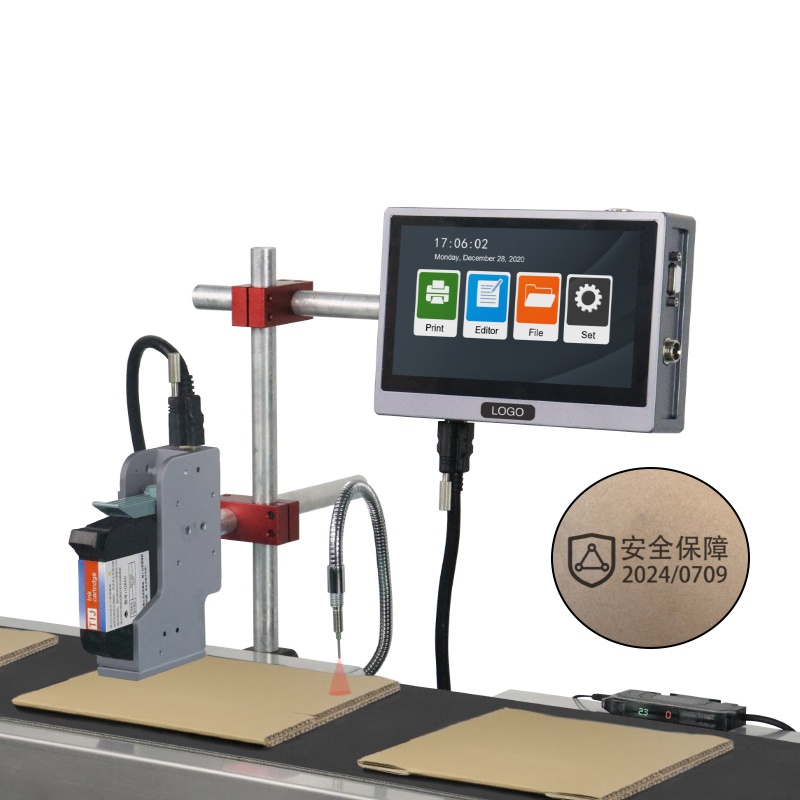
K20 online inkjet printer
the single-head build most retrofits land on:
- Prints up to 120m/min
- 600dpi HD print accuracy
- 2-25.4mm print height
- 7-Inch Touch Screen
- 2-5mm throw distance
A 25.4 mm print height covers a three-line date with room for a batch code, and the 2 to 5 mm throw distance lets the head sit clear of a guide rail. The 600 dpi matters more than the 120 m/min rating, because a barcode that scans needs dot integrity.
Bracket design follows the same logic as the conveyor belt it hangs over: rigid, adjustable in two axes, and bolted to a member that does not carry the drive.
Send the Belt Speed, Not the Brochure
- Can one head mark both sides
- Only with two heads and a shared trigger, since one head cannot fire through the product.
- Does the coder need the line PLC
- No, a product sensor and an encoder are enough, and that keeps the retrofit inside a single shift.
- What if the belt stops mid-block
- The job aborts and resumes on the next trigger, which is why the sensor position matters more than the queue.
Send the belt speed, the block height and the tightest gap. We return the mounting height, sensor position and encoder ratio in writing, so the marking machine with conveyor is set from your numbers. Builds follow the ISO 9001 quality management route.
Next Steps
- Trigger rules for scanning codes are set out in barcode printer with conveyor.
- Start at the contact page, on +86 17625427465 or kuangcy@126.com. We reply within 24 hours.